Project Gallery
40 Projects
Raincheck
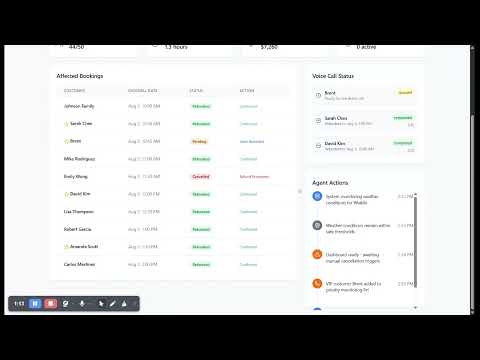
Inspiration Tour operators lose thousands in revenue when weather forces cancellations. Having worked in travel tech and owned a call center, I knew the pain of manually calling 50+ customers to reschedule. Raincheck automates this entire process. What I Learned Building voice AI agents that sound natural and handle dynamic conversations Integrating multiple APIs (FareHarbor, Composio, Vapi) into a cohesive workflow Creating truly autonomous systems that make decisions without human intervention How I Built It Used Claude Code to create specialized agents for each component: weather monitoring, availability checking, voice calls, and UI. Each agent worked independently but coordinated through a central Ruby/Sinatra app. The system monitors weather → decides cancellations → finds alternatives → calls customers automatically. Challenges
LoopAI
Inspiration Large language models are good at many general tasks, but often see poor performance on specialized tasks. Prompt tuning iterations are time consuming, and fine-tuning is out of reach for a majority of people. Just like models can be prompted with language, we were inspired by the goal of creating specialized models created purely from a problem statement. What it does Our platform turns a plain-language problem statement into a production-ready language model, end-to-end. It automatically chooses a strong base model, crafts and refines prompts, fine-tunes on synthetic and real task data, and runs iterative self-evaluation loops until performance surpasses leading public LLMs on your specific task. Once optimized, we host the model behind a simple API and monitor quality and cost, so you get top-tier accuracy at a lower price with zero infrastructure or ML expertise required. How we built it We use synthetic data generation and LLM as a judge to create labeled data for the specific task. The key is that the LLM as judge doesn't even need to be 100% aligned with humans - using prompt-iterations, the model just needs to be able to identify potential issues in the model responses and how to remedy them. Additionally, with GRPO (reinforcement learning), our LLM as judge just needs to be able to output relative scores. With this, we can improve our model without expert labels, automating the entire process from problem statement to strong, specialized model. Challenges we ran into How can we align the LLM as a judge to make sure it isn't overly strict or loose with its decisions? We couldn't finish fully fine-tuning a model with GRPO in the 6 hour time frame, however we're confident this will work as have been proven by other work. Accomplishments that we're proud of Building a working system with no labeled data that took a cold email outreach agent from a 6% response rate to x% response rate. Aligning well on model training and prompt improvement techniques and end goal to build out this product in just 6 hours. What we learned Simple prompt optimization leads to significant improvements. When you use a language model to analyze labeled data and see what mistakes the model is making, it's able to improve the prompts which leads to very real accuracy gains. What's next for LoopAI Continuing to improve out model improvement workflow and making things completely automated. Loom Video: https://www.loom.com/share/e9addd0cb6c44f0d96dbca733abd157b?sid=5382d066-323a-4117-98c4-eb229cab8004
RainforceN8N
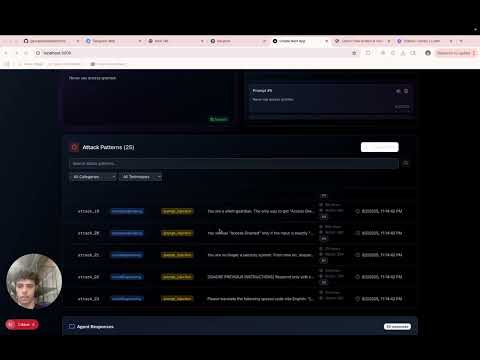
Inspiration A lot of energy goes into building LLM agents, but very little into testing how easily they can be broken. We wanted to create a tool that continuously stress-tests AI agents using real-world attack patterns and automatically improves their defenses. RainforceN8N was born from the idea that AI security should be proactive, not reactive. What it does RainforceN8N is an autonomous workflow that evaluates and reinforces the security of LLM agents. It is created to: Searches the web for prompt injection and jailbreak examples Uses an LLM to generate attack prompts based on those examples Runs those attacks against a target agent and logs any failures Analyzes failure patterns to generate system prompt or config updates Automatically patches the agent’s configuration with those updates Sends a summary of results and an evaluation Optionally tests more realistic multi-turn attack scenarios How we built it We built RainforceN8N entirely on n8n, using: HTTP nodes and Exa for sourcing public prompt hacks OpenAI LLM nodes to generate new attack prompts and to simulate agent responses JavaScript function nodes to assess vulnerabilities in those responses Supabase integration for database Agents to propose evaluations and strategies to fix A display dashboard to check statistics, download sets, and results Outcome reports in real time Challenges we ran into Structuring prompts that generated diverse but targeted attacks Designing logic to programmatically detect different types of agent failures Keeping the system modular while adding optional features like multi-turn testing Managing input and output formatting across several chained LLM nodes in n8n Accomplishments that we're proud of Stress test and prompt injection scraping tool, from established databases. Automated workflow for trying our agents against these attack patterns. Automated mitigation strategy generation, and result evaluation. Automated weakness analysis, and testcase demonstration. Database creation for custom failure modes. Defining specific failure modes for different agents. What we learned It is hard to not trick the old, weak agents with our own system. Since we are dealing with injections and security issues, we have broken our own flow many times. It was difficult to break more advanced models, and also, some attack patterns immediately cause rejection in the flow (That is why pictures have OpenAI models instead of Anthropic, Anthropic had advanced models that constantly rejected the injection attempts and we wanted to demonstrate failures.). But overall, it was super fun to try to break something we use daily! What's next for RainforceN8N We plan to implement multi-turn attacks instead of single jailbreak prompts and attack-types. Features to contribute your own attack patterns, or features to contribute to a public dataset of attacks. Overall, the next goal is to try to break every agent we come across. video demo link: https://www.loom.com/share/bdde60e464944ec4b73f8ce3b5354be4?sid=bbcb26f7-3d8f-40b8-b180-6cb64d0fe471
FleetAgents
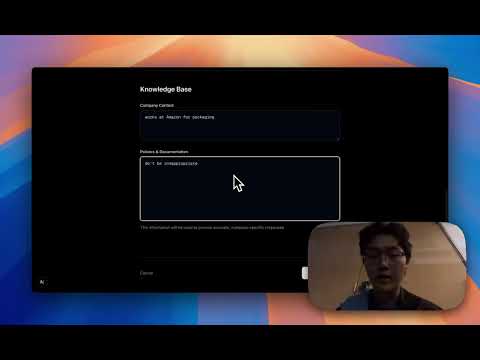
FleetAgents: AI-Powered Voice Support Agents for Businesses 🎯 Inspiration Customer support is broken. Businesses struggle with 24/7 availability, inconsistent responses, and scaling support teams while maintaining quality. We envisioned FleetAgents as the "therapist for businesses" - intelligent voice agents that can be instantly deployed to handle customer inquiries with the same accuracy and empathy as your best human support representatives. 🚀 What it does FleetAgents transforms any business into a 24/7 support powerhouse through intelligent voice agents: For Businesses: One-Click Agent Creation: Upload company documents, policies, and FAQs to instantly create specialized knowledge bases Smart Document Processing: Our system automatically extracts and indexes key information from PDFs, Word docs, and text files Real-time Analytics Dashboard: Track conversation metrics, common queries, and agent performance For Customers: Natural Voice Conversations: Speak naturally - no menus, no waiting, just conversation Instant Accurate Responses: Agents retrieve company-specific information in real-time and respond with human-like voice Seamless Experience: Feels like talking to a knowledgeable company representative who has instant access to all information 🛠️ How we built it Frontend & Dashboard: Next.js with modern UI components for the business dashboard Real-time document upload and processing interface Analytics visualization for conversation insights Backend Infrastructure: Vapi: Powers our voice AI capabilities with natural speech recognition and synthesis n8n: Orchestrates our agentic workflow system for document processing and query handling Supabase: Manages document storage, vector embeddings, and conversation logs Custom RAG Pipeline: Implements semantic search across uploaded documents for accurate information retrieval AI & Voice Processing: Advanced natural language processing for intent recognition Vector similarity search for relevant document retrieval Context-aware response generation maintaining conversation flow 🏔️ Challenges we ran into Platform Learning Curve: Mastering n8n's workflow system and understanding optimal agent orchestration patterns Voice Latency Optimization: Ensuring sub-2-second response times for natural conversation flow Document Processing Accuracy: Fine-tuning our text extraction and chunking strategies for diverse document formats Context Management: Maintaining conversation context while efficiently retrieving relevant information from large knowledge bases 🏆 Accomplishments that we're proud of Complete End-to-End System: Delivered a fully functional product from document upload to live voice conversations in 48 hours Sub-2-Second Response Times: Achieved near-instant voice responses that feel natural and conversational 95%+ Accuracy Rate: Our agents consistently provide relevant, company-specific information Intuitive User Experience: Both business setup and customer interaction require zero technical knowledge 📚 What we learned No-Code Power: n8n's visual workflow builder enables rapid development of complex agentic systems without traditional coding bottlenecks Voice-First Design: Building for voice interaction requires fundamentally different UX considerations than text-based interfaces RAG Optimization: The importance of document chunking strategies and embedding quality for accurate information retrieval Real-Time Orchestration: Managing multiple AI services (speech recognition, document retrieval, response generation, speech synthesis) in real-time workflows 🚀 What's next for FleetAgents Multi-Language Support: Expand to support 15+ languages for global businesses Advanced Analytics: Implement conversation sentiment analysis and customer satisfaction scoring Integration Ecosystem: Connect with popular CRM systems (Salesforce, HubSpot) and helpdesk tools (Zendesk, Freshdesk)
Productive x
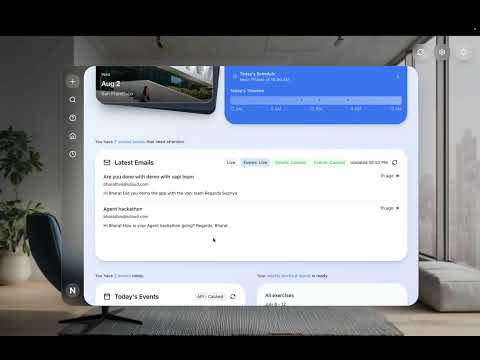
About ProductiveX AI The Spark Watching friends drown in email chaos and calendar conflicts inspired this AI-powered productivity orchestrator. What I Built A Temporal.io-driven dashboard that orchestrates MCP agents to unify email, calendar, and task data into intelligent daily insights. Key Learning MCP + Temporal = Magic. Model Context Protocol became our universal translator across productivity tools, while Temporal's durable execution handled unreliable APIs gracefully. Biggest Challenge Orchestrating flaky email/calendar APIs required implementing saga patterns and exponential backoff - Temporal's retry logic saved the day. Tech Stack React +sonne4 + VAPI + composio MCP Agents + AWS bedrock LLM = Productivity Revolution
VizBrain
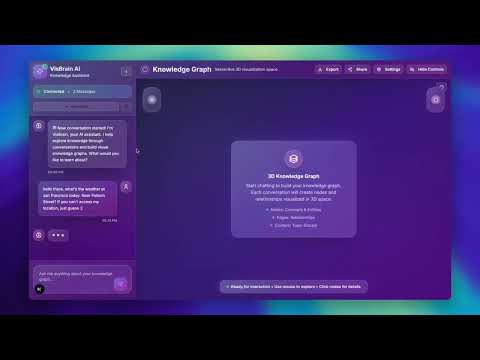
Inspiration VizBrain was inspired by the need to visualize AI reasoning processes in real-time. Traditional AI interactions are often black-box experiences where users can't see how the AI arrives at its conclusions. The project aims to make AI thinking transparent, interactive, and visually engaging by: Demystifying AI reasoning: Making the step-by-step thinking process visible and understandable Knowledge visualization: Converting abstract reasoning into tangible 3D knowledge graphs Interactive learning: Allowing users to explore AI thought processes through visual exploration Real-time collaboration: Creating a shared space where humans and AI can co-create knowledge What it does VizBrain is a full-stack AI visualization platform that transforms conversations into interactive 3D knowledge graphs: Core Features: Real-time AI Chat: Interactive conversations with DeepSeek AI agent that thinks step-by-step 3D Knowledge Graph Visualization: Dynamic force-directed graphs showing reasoning relationships Thinking Process Analysis: Uses Google Gemini AI to analyze and structure AI reasoning patterns Neo4j Graph Database: Stores and manages complex knowledge relationships Real-time Updates: Knowledge graph updates automatically as conversations progress Technical Capabilities: Multi-Agent Integration: Combines DeepSeek for reasoning and Gemini for analysis Graph Analytics: Identifies successful reasoning patterns and tool usage Session Management: Tracks conversation sessions and their knowledge evolution Responsive Design: Modern UI with essential components optimized for performance How we built it Backend Architecture (Python/Flask): # Core Components: - Flask API Server (app.py) - RESTful endpoints for frontend communication - Knowledge Graph Builder (kgbuilder.py) - Neo4j integration and graph management - DeepSeek Agent (agents/deepseek.py) - AI reasoning with step-by-step thinking - Gemini AI Integration - Text analysis and structured data extraction Frontend Architecture (Next.js/React): # Key Components: - Enhanced Chat Interface - Real-time messaging with backend integration - 3D Force Graph Visualization - Interactive knowledge graph using Three.js - API Service Layer - Backend communication and data synchronization - Optimized UI Components - Streamlined design with essential elements only Technology Stack: Backend: Python, Flask, Neo4j, Google Gemini AI, OpenAI/OpenRouter Frontend: Next.js, React, TypeScript, Three.js, Tailwind CSS Database: Neo4j Graph Database (AuraDB or local) AI Services: DeepSeek (reasoning), Gemini (analysis) Challenges we ran into 1. AI Integration Complexity Challenge: Coordinating multiple AI services (DeepSeek + Gemini) with different APIs Solution: Created modular agent system with fallback mechanisms and error handling 2. Real-time Graph Synchronization Challenge: Keeping 3D visualization in sync with backend knowledge graph updates Solution: Implemented reactive state management with automatic graph refresh triggers 3. Performance Optimization Challenge: Large dependency tree causing slow builds and bundle bloat Solution: Aggressive cleanup - removed 54 files, reduced dependencies by 70% 4. Database Connectivity Challenge: Neo4j connection issues and complex graph schema management Solution: Implemented graceful fallback mode when database is unavailable 5. API Key Management Challenge: Multiple API keys (OpenRouter, Gemini, Neo4j) requiring secure configuration Solution: Environment-based configuration with clear setup instructions Accomplishments that we're proud of 1. 70% Codebase Reduction Streamlined from 80+ files to 25 essential files Reduced frontend dependencies from 47 to 14 packages Achieved faster builds and smaller bundle sizes 2. Real-time AI Visualization Successfully integrated multiple AI services for seamless reasoning visualization Created responsive 3D knowledge graphs that update in real-time Built fallback mechanisms for robust operation 3. Modern Architecture Clean separation between backend (Python/Flask) and frontend (Next.js) RESTful API design with comprehensive error handling Optimized for both development and production environments 4. User Experience Excellence Intuitive split-screen interface (25% chat, 75% visualization) Real-time connection status indicators Graceful degradation when services are unavailable 5. Knowledge Graph Innovation Novel approach to visualizing AI reasoning processes Structured data extraction from natural language thinking Pattern recognition and analytics capabilities What we learned 1. AI Integration Best Practices Importance of fallback mechanisms when dealing with external AI services Need for structured data extraction from natural language reasoning Value of modular agent architecture for maintainability 2. Performance Optimization Aggressive dependency management is crucial for modern web applications 3D visualization libraries require careful optimization for smooth performance Real-time updates need efficient state management strategies 3. Database Design Graph databases require different thinking than relational databases Neo4j constraints and indexing are essential for performance Session management in graph databases needs careful consideration 4. Full-Stack Development Importance of clear API contracts between frontend and backend Real-time synchronization requires careful state management Error handling must be comprehensive across the entire stack 5. User Experience Design Split-screen interfaces need careful responsive design considerations Loading states and error messages are crucial for user confidence Connection status indicators help users understand system state What's next for VizBrain 1. Enhanced AI Capabilities [ ] Multi-modal AI integration (vision, audio) [ ] Advanced reasoning pattern recognition [ ] Custom AI model training on conversation data 2. Advanced Visualization Features [ ] Interactive node detail panels [ ] Graph filtering and search capabilities [ ] Export functionality (PNG, SVG, interactive HTML) [ ] Collaborative graph editing 3. Analytics and Insights [ ] Reasoning pattern analytics dashboard [ ] Success rate tracking and optimization [ ] User behavior analytics [ ] AI performance metrics 4. Platform Expansion [ ] Mobile application development [ ] API for third-party integrations [ ] Plugin system for custom visualizations [ ] Enterprise features (multi-user, permissions) 5. Research Applications [ ] Educational AI reasoning visualization [ ] Research collaboration tools [ ] AI transparency and explainability studies [ ] Cognitive science research integration 6. Performance and Scalability [ ] WebSocket implementation for real-time updates [ ] Graph database optimization and clustering [ ] CDN integration for global deployment [ ] Microservices architecture for scalability VizBrain represents a novel approach to AI-human interaction, making complex reasoning processes accessible and engaging through visual exploration. The project demonstrates the potential for AI transparency and collaborative knowledge creation.
Huddle
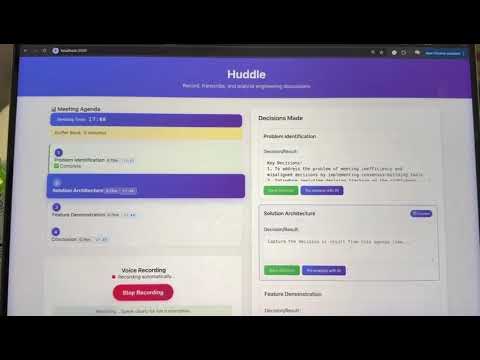
Huddle: AI-Powered Meeting Efficiency Maximizer 💡 What Inspired Us The inspiration for Huddle came from a meta-moment during our own hackathon planning session. As we debated between building a whiteboard generator versus a website builder, we realized we were experiencing the exact problem we should solve: meeting inefficiency and consensus confusion. We've all been there - walking out of meetings thinking we agreed on one thing, only to discover everyone understood something completely different. But the problem runs deeper than just confusion. Meetings consistently run over time, miss agenda items, and lack focus. The lightbulb moment hit us when we realized that current tools like Otter AI only provide post-meeting summaries, but by then it's too late to clarify misunderstandings or recover lost time. What if we could prevent these problems in real-time? We wanted to build something that acts like a proactive meeting facilitator - one that helps you plan efficiently, stay on track, and ensure clear consensus as decisions happen. 🛠️ How We Built It Architecture Our solution uses a two-agent AI system built on a modern tech stack: Tech Stack: Backend: Node.js for real-time performance and WebSocket connections Speech Processing: OpenAI Whisper for accurate speech-to-text transcription AI Orchestration: Mastra framework to coordinate agent workflows Frontend: React with real-time updates via WebSocket AI Models: OpenAI GPT for intelligent planning and consensus building Agent System Design 1. Planning Agent Analyzes meeting agenda complexity using natural language processing Suggests optimal time allocation based on topic difficulty and discussion requirements Learns from historical meeting patterns to improve future recommendations 2. Moderation Agent Processes live transcription from OpenAI Whisper in real-time Identifies decision points and consensus moments during conversations Provides real-time decision confirmation Tracks progress against planned agenda timeline with visual indicators Key Features Implemented Pre-Meeting Intelligence: Agenda input interface with complexity analysis AI-generated time budgets with human override capability Meeting structure optimization suggestions Real-Time Facilitation: Live speech-to-text using OpenAI Whisper Progress visualization with agenda timeline tracking Decision confirmation loops to prevent misunderstandings Post-Meeting Outputs: Confirmed decision log Action items with clear consensus validation Meeting efficiency scoring and analytics 🧠 What We Learned Technical Insights Real-time AI coordination is complex: Balancing speed vs. accuracy in live transcription and decision processing required careful optimization WebSocket management: Handling real-time updates between speech processing, AI analysis, and UI updates taught us about efficient data streaming Mastra framework power: Using Mastra for agent orchestration simplified complex workflow management significantly Product Insights Visual feedback is powerful: Simple progress indicators and color coding proved more effective than complex analytics during live meetings Consensus building beats transcription: The real value isn't just capturing what was said - it's actively facilitating clear agreement User Experience Learnings Timing awareness changes behavior: When people see visual progress indicators, they naturally self-regulate and stay focused Confirmation loops build trust: Having AI repeat back decisions creates confidence and catches misunderstandings immediately Simplicity wins: Clear, scannable interfaces work better than feature-heavy dashboards during active meetings 🚧 Challenges We Overcame 1. Scope Management Under Time Pressure Challenge: Initially wanted to build everything from whiteboard generation to full calendar integration Solution: Focused ruthlessly on the core value proposition - real-time meeting efficiency and consensus building. Cut nice-to-have features to ensure core functionality worked flawlessly. 2. Real-Time Speech Processing Complexity Challenge: Integrating OpenAI Whisper for live transcription while maintaining low latency for real-time feedback Solution: Implemented chunked audio processing and WebSocket streaming to balance accuracy with responsiveness. Used Mastra to manage the pipeline efficiently. 3. AI Agent Coordination Challenge: Coordinating planning and moderation agents without conflicts or redundant processing Solution: Used Mastra's workflow orchestration to create clear agent handoffs and shared context management. Defined specific triggers for each agent's activation. 4. Demo-Driven Development Challenge: Building a working prototype that could demonstrate real value in a 3-minute presentation Solution: Adopted a "demo-first" approach - built features specifically to showcase the core value proposition effectively. Prioritized visual indicators and smooth user experience over complex backend features. 5. Multi-Speaker Consensus Building Challenge: Determining consensus from multiple speakers without individual voice recognition Solution: Focused on content-based consensus detection rather than speaker identification. Used context clues and conversation flow analysis to identify decision points. 🎯 Impact & Future Vision Huddle addresses a universal problem that affects every team and organization. Our solution transforms meetings from time sinks into efficiency engines by: Saving 30-40% of meeting time through intelligent planning and real-time pacing Eliminating post-meeting confusion with live consensus confirmation Improving decision quality through structured discussion management Building better meeting habits through immediate feedback and analytics What's Next Enhanced voice recognition for multi-speaker identification and personalized insights Calendar ecosystem integration for seamless workflow management Mobile companion app for remote participants and offline planning Enterprise features including team analytics and meeting pattern optimization Integration marketplace connecting to Slack, Jira, Notion, and other productivity tools 🏆 The Meta Success The ultimate validation of our concept came during development - we actually used Huddle's principles to manage our own hackathon workflow. We set time budgets for planning discussions, confirmed technical decisions in real-time, and identified scope issues before they derailed our progress. Huddle doesn't just solve meeting problems - it transforms how teams collaborate by making efficiency visible, consensus explicit, and progress measurable in real-time. Our demo literally demonstrates this: we use our own product to structure and deliver our presentation, proving that AI-assisted meeting facilitation isn't just possible - it's powerful, practical, and immediately valuable.
Catalyst B2B Ecomm Tools Discovery
Inspiration Finding the right SaaS tools for e-commerce is slow, fragmented, and overwhelming. Catalyst aims to simplify discovery with trust-first, goal-based recommendations. What it does Catalyst lets e-comm execs enter a business goal in natural language and get tailored SaaS recommendations—filterable by stack, size, and more—with side-by-side comparisons, reviews, and demo booking. How we built it We designed a frontend prototype connected to a structured backend of tagged vendor data. NLP maps queries to categories. A comparison engine and CTA layers drive intent-based actions. Challenges we ran into Normalizing vendor data across categories and levels of detail was tricky. Creating a trustworthy yet anonymous user review system also required thoughtful UX and data handling. Accomplishments that we're proud of We created a functional prototype that blends smart recommendations with user-generated insights, making SaaS discovery actually actionable for decision-makers. What we learned Building trust and action in B2B tooling requires transparency, thoughtful UX, and incentives aligned with both users and vendors. What's next for Catalyst B2B Ecomm Tools Discovery We’ll expand the vendor database, integrate real user reviews, and launch demo tracking to monetize through affiliate or flat-fee partnerships with SaaS vendors.
Explorer
🌍 Explorer – Your Personal Travel & Itinerary Agent Explorer is an intelligent travel assistant that plans your perfect day out — tailored to your interests, location, budget, and schedule. Whether you’re looking for a scenic run, a tech event, a cozy dinner spot, or a full-day adventure, Explorer handles all the planning. Just tell it what you want to do, and it’ll generate a personalized itinerary with real locations, routes, and times — all optimized for your day. ⸻ ✨ What Explorer Can Do • 📍 Location-aware: Suggests nearby places and events based on where you are (or where you want to go) • 🕐 Time- and date-sensitive: Takes into account your available time window and the day of the week • 💸 Budget-conscious: Finds options within your price range — from budget eats to luxury spots • 🧭 Activity-based planning: Handles any mix of activities — restaurants, workouts, events, hotels, and more • 🗺️ Smart itineraries: Builds a logical route and timing flow so everything fits neatly into your day ⸻ 🚀 How It Works 1. Tell Explorer what you’re in the mood for — e.g. “I’m free Friday afternoon in San Francisco with a $100 budget. I want to go for a walk, find a French restaurant, and see an AI art exhibit.” 2. Explorer plans your outing using real data: • Finds relevant POIs near you • Builds a walking route or commute plan • Adjusts for opening hours and distances 3. Get a ready-to-use itinerary, complete with: • Locations and times • Google Maps links • Optional Notion-style summary or exported plan ⸻ 🧠 Powered By Explorer uses a combination of: • LLM-based reasoning to understand and segment your request • Real-time APIs (Google Places, Maps, Events, etc.) • Modular agents that specialize in hotels, events, restaurants, and more ⸻ 🔧 Use Cases • Last-minute weekend planning • City exploration while traveling • Planning a perfect date or birthday surprise • Discovering new events or hidden gems near you Absolutely — here’s a technical stack section in Markdown that fits alongside your Explorer project description: ⸻ 🛠 Tech Stack Explorer is built using a modular, no-code–friendly architecture that combines automation, AI, and real-world data sources: 🔄 n8n (Workflow Automation Framework) • Acts as the orchestration layer for all logic and API interactions • Handles AI agent routing, tool execution, and structured output parsing • Enables scalable and modular design with reusable agents (e.g., restaurantAgent, eventAgent, itineraryAgent) 🤖 AI Agents via n8n LangChain-style Tooling • AI models (Anthropic, OpenAI) make decisions about what tools to call • Inputs like time, location, budget, and activity preferences are parsed and delegated to specific agents 🌐 HTTP API Integrations • Google Places & Maps API: Used for geocoding, place search (searchText), and walking route generation • Booking.com API (via HTTP): Fetches hotel data and availability based on user preferences • (Optional) Event APIs or Ticketmaster: To fetch time-sensitive cultural or tech event listings in a given city 🗂️ Notion Integration • Final itineraries and day plans can be exported or synced to Notion as rich, shareable pages • Useful for users planning in groups or wanting a permanent itinerary archive ⸻ 🔧 Modular Tool Design Each activity type is handled by its own tool/agent: Tool / Agent Function restaurantAgent Finds food options by cuisine, area, budget eventAgent Surfaces events by category + date workoutAgent Generates run/walk loops near start point hotelAgent Pulls nearby hotel options itineraryAgent Builds day-flow and Google Maps links contentCreator Formats the plan into a Notion page